

Note
Go to the end to download the full example code.
Create and modify charts#
This example demonstrates how to create and work with charts in Result Explorer:
Chart creation using the
ChartDefinitionandChartResultobjects to define result series with filters and field selections.Multi-result charts combining equivalent stress, temperature, and contact pressure results in a single chart.
Chart display options to control legend visibility, table display, and active series selection.
Chart updates to add or modify result series in an existing chart.
Snapshot capture to save chart visualizations as images.
Import the Result Explorer dependencies.
from ansys.result_explorer.core import (
    ChartDefinition,
    ChartResult,
    Field,
    Filter,
    ResultFieldName,
    ResultType,
    ShellPosition,
    launch_result_explorer,
)
from ansys.result_explorer.core.examples import (
    ExampleKeys,
    get_example_file,
    get_example_snapshot_settings,
)
Launch Result Explorer#
Start a Result Explorer instance for this example.
rx = launch_result_explorer()
Load example data#
Create a solution from a transient analysis result file with multiple time steps. Print the solution to inspect available results and configurable chart types.
rst_path = get_example_file(ExampleKeys.RST_CP_TRANSIENT)

sol = rx.create_solution(
    name="Chart Example Solution",
    file_path=rst_path,
)
print(f"Created solution: {sol.name}")
print(f"  Time steps: {sol.n_sets}")
print(sol)
Created solution: Chart Example Solution
  Time steps: 15


======================================================================
Solution: Chart Example Solution
======================================================================
ID:                      c41ea68b-2590-4038-af2f-25389206ec48
Description:             N/A

Status:
  Ready:                   Yes
  Live:                    No

Result Files:
  - /home/runner/work/pyresultexplorer/pyresultexplorer/tests/data/cp_trans/file.rst (key: rst)

Analysis Information:
  Physics Type:            mechanical
  Analysis Type:           transient
  Solver Version:          24.2
  Unit System:             MKS: m, kg, N, s, V, A, degC

Mesh Information:
  Num Elements:            122
  Num Nodes:               406
  Num Named Selections:    13
  Num Bodies:              10
  Distance Unit:           m

Results Information:
  Num Sets:                15
  Available Results:       24
  Time/Freq Unit:          s

Available Plot Results:
  Displacement
    - total_displacement
    - displacement [X, Y, Z]
  Stress
    - stress_tensor [XX, YY, ZZ, XY, YZ, XZ]
    - equivalent_von_mises_stress
    - principal_stress_1 [1]
    - principal_stress_2 [2]
    - principal_stress_3 [3]
  Velocity
    - total_velocity
    - velocity [X, Y, Z]
  Acceleration
    - total_acceleration
    - acceleration [X, Y, Z]
  Temperature
    - temperature
  Heat Flux
    - total_heat_flux
    - heat_flux [X, Y, Z]
  Structural Temperature
    - structural_temperature
  Contact
    - contact_status
    - contact_pressure
    - contact_penetration
    - contact_sliding_distance
    - contact_gap_distance
    - contact_friction_stress
    - contact_total_stress
    - contact_fluid_penetration_pressure
    - contact_surface_heat_flux
  Newton Raphson Residual
    - total_force
    - total_moment
  User Defined

Solver Text Outputs (Logs):
  - solve.out
  - file.err
  - file.gst
  - file.cnd
======================================================================
Create a workspace#
workspace = rx.create_workspace(name="Chart Example Workspace")
Create a chart#
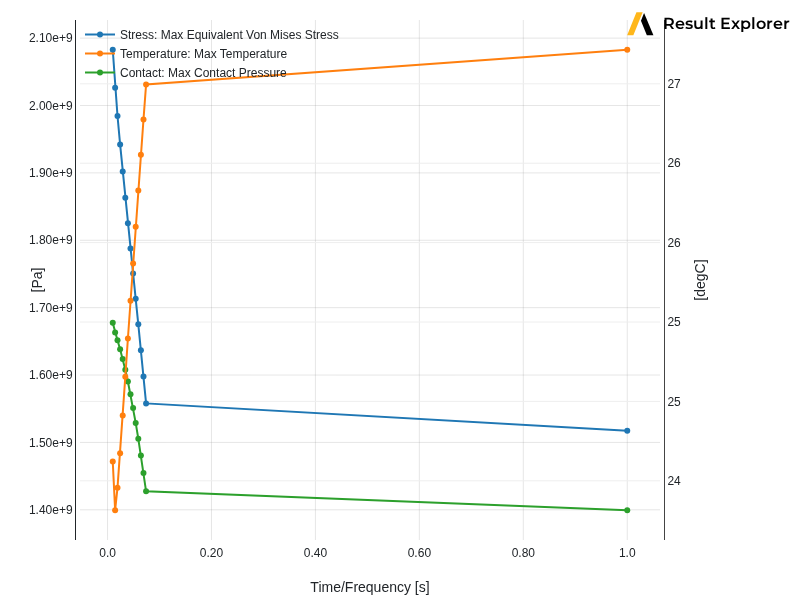
Build a chart that plots equivalent von Mises stress, temperature, and
contact pressure over all time steps. Filter.max keeps only the
maximum value per step so the chart shows peak results.
chart = sol.create_chart(
    ChartDefinition(
        name="Stress, Temperature & Contact Pressure Over Time",
        all_sets=True,
        results=[
            ChartResult(
                result_type=ResultType.stress,
                name="Stress",
                location="Nodal",
                fields=[Field(ResultFieldName.equivalent_von_mises_stress)],
                filters=[Filter.max],
                shell_position=ShellPosition.all,
            ),
            ChartResult(
                result_type=ResultType.temperature,
                name="Temperature",
                location="Nodal",
                fields=[Field(ResultFieldName.temperature)],
                filters=[Filter.max],
            ),
            ChartResult(
                result_type=ResultType.contact,
                name="Contact",
                location="Nodal",
                fields=[Field(ResultFieldName.contact_pressure)],
                filters=[Filter.max],
            ),
        ],
    )
)

print(f"\nCreated chart view: '{chart.name}'")
print(f"Chart definition id: {chart.definition.id}")
Created chart view: 'Stress, Temperature & Contact Pressure Over Time'
Chart definition id: 1e1fecc7-783a-422e-89d6-9aebdddd76a0
Assign the chart to a viewport#
Assign the chart view to a viewport and wait for it to finish rendering.
viewport = workspace.assign_view(view=chart, wait=True)
print(f"\nViewport assigned: {viewport.id}")
Viewport assigned: 7db10ccf-f959-4f18-9be3-e650cb684d28
Inspect chart display options#
Read the available series and chart names provided by the server after rendering, then print them so you can reference them by name.
opts = viewport.display_options

print(f"\nAvailable series: {opts.series_names}")
print(f"Available charts: {opts.chart_names}")
print(f"Active series:    {opts.active_series}")
Available series: ['Time/Frequency', 'Stress: Max Equivalent Von Mises Stress', 'Temperature: Max Temperature', 'Contact: Max Contact Pressure']
Available charts: ['Stress, Temperature & Contact Pressure Over Time']
Active series:    ['Stress: Max Equivalent Von Mises Stress', 'Temperature: Max Temperature', 'Contact: Max Contact Pressure']
Configure display options#
Enable the legend and show the data table beneath the chart.
opts.show_legend = True
opts.show_table = True
Select active series#
Restrict the viewport to display only the stress series so temperature and contact pressure are hidden.
if opts.series_names:
    opts.active_series = opts.series_names[1:2]
    print(f"\nActive series (stress only): {opts.active_series}")

viewport.save_snapshot(
    file_path="030-chart-stress-only.png",
    settings=get_example_snapshot_settings(),
)
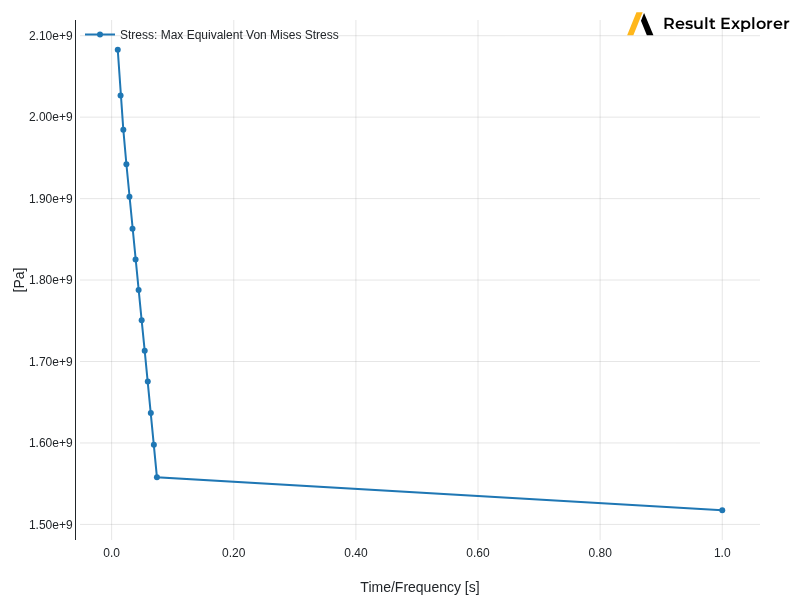
Active series (stress only): ['Stress: Max Equivalent Von Mises Stress']
Restore all series#
Re-activate all available series.
opts.active_series = opts.series_names[1:]

viewport.save_snapshot(
    file_path="030-chart-with-all-quantities.png",
    settings=get_example_snapshot_settings(),
)
List charts in the solution#
sol.charts now returns a list of native ChartDefinition objects.
print("\nCharts in solution:")
for c in sol.charts:
    print(f"  {c.name!r} — {len(c.results)} result series")

rx.stop()
Charts in solution:
  'Min/Max Displacement Over Time' — 1 result series
  'Min/Max Equivalent Stress Over Time' — 1 result series
  'Temperature Over Time' — 1 result series
  'Stress, Temperature & Contact Pressure Over Time' — 3 result series
Total running time of the script: (0 minutes 21.503 seconds)