

Note
Go to the end to download the full example code.
Work with contact and convergence trackers#
This example demonstrates how to work with tracker viewports in Result Explorer:
Convergence trackers to monitor solver convergence across iterations.
Contact trackers to visualize and analyze contact behavior in transient simulations.
Tracker viewport metadata to read and display properties of tracker visualizations.
Active series configuration for contact trackers to select specific analysis types.
Display options to customize tracker visualization (legend, table, split direction).
This example uses a transient contact analysis result with convergence and contact tracking data.
Import the Result Explorer dependencies.
from ansys.result_explorer.core import (
    ContactTrackersViewportMetadata,
    launch_result_explorer,
)
from ansys.result_explorer.core.examples import (
    ExampleKeys,
    get_example_file,
    get_example_snapshot_settings,
)
Launch Result Explorer#
Start a Result Explorer instance for this example.
rx = launch_result_explorer()
Load example data#
Create a solution from the transient contact analysis.
rst_path = get_example_file(ExampleKeys.RST_CP_TRANSIENT)

sol = rx.create_solution(
    name="Contact Transient Analysis",
    file_path=rst_path,
)
print(f"Created solution: {sol.name}")
print(f"  Elements: {sol.n_elements}, Nodes: {sol.n_nodes}")
Created solution: Contact Transient Analysis
  Elements: 122, Nodes: 406
Find tracker views#
Locate convergence and contact trackers views in the solution.
convergence_view = sol.convergence_trackers_view
contact_view = sol.contact_trackers_view

assert convergence_view is not None, "Convergence trackers view not found in solution"
assert contact_view is not None, "Contact trackers view not found in solution"

print(f"Found convergence trackers view: {convergence_view.name}")
print(f"Found contact trackers view: {contact_view.name}")
Found convergence trackers view: Convergence Trackers
Found contact trackers view: Contact Trackers
Create workspace with grid layout#
Create a workspace with a 2x1 grid for tracker viewports.
workspace = rx.create_workspace(name="Tracker Viewports", rows=2, cols=1)
print(f"Created workspace with {len(workspace.viewport_ids)} viewports (2x1 grid)")
Created workspace with 2 viewports (2x1 grid)
Configure convergence trackers viewport#
Assign and configure the convergence trackers view.
conv_viewport = workspace.viewports[0]
conv_viewport.set_view(convergence_view, wait=True)

conv_opts = conv_viewport.display_options
print("\nConfiguring convergence trackers viewport:")
print(f"  Selected tracker: {conv_opts.selected_tracker_name}")

conv_viewport.save_snapshot(
    file_path="020-convergence-trackers.png", settings=get_example_snapshot_settings()
)
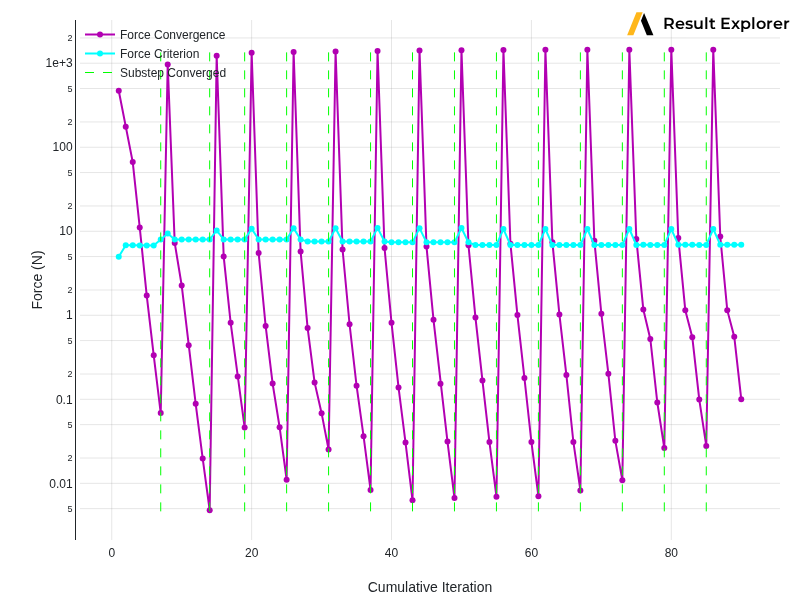
Configuring convergence trackers viewport:
  Selected tracker: Force Convergence
Configure contact trackers viewport#
Assign and configure the contact trackers view with available options.
contact_viewport = workspace.viewports[1]
contact_viewport.set_view(contact_view, wait=True)

contact_meta: ContactTrackersViewportMetadata = contact_viewport.metadata
print("\nConfiguring contact trackers viewport:")

# Show available trackers
trackers = contact_meta.contact_tracker_names
print(f"  Available contact trackers: {len(trackers)}")
for tracker in trackers:
    print(f"    - {tracker}")

# Configure active trackers
contact_opts = contact_viewport.display_options
contact_opts.active_contact_trackers = trackers

# Show available series
series = contact_meta.series_names
print(f"  Available data series: {len(series)}")
for s in series:
    print(f"    - {s}")

contact_viewport.save_snapshot(
    file_path="020-contact-trackers.png", settings=get_example_snapshot_settings()
)
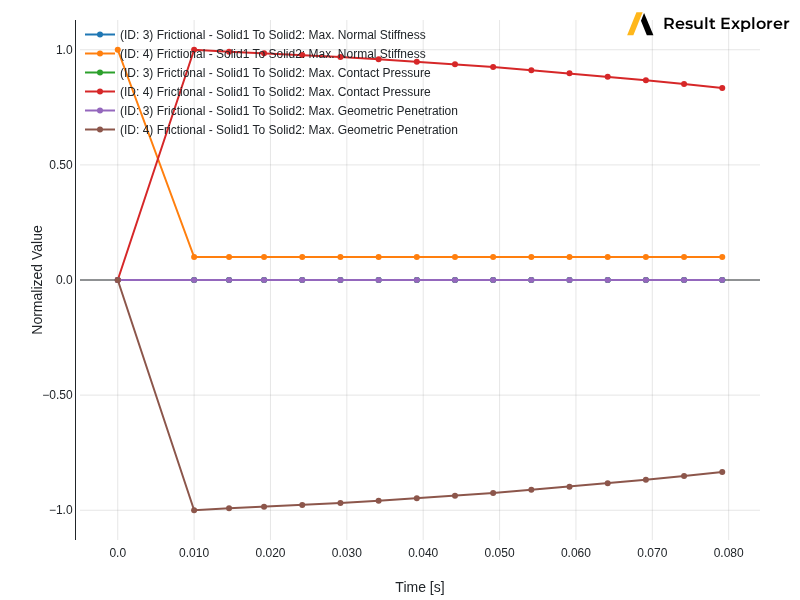
Configuring contact trackers viewport:
  Available contact trackers: 2
    - (ID: 3) Frictional - Solid1 To Solid2
    - (ID: 4) Frictional - Solid1 To Solid2
  Available data series: 46
    - Number of Contact Elements in Contact
    - Number of Contact Elements in Contact (Sticking)
    - Max. Chattering Level
    - Max. Penetration/Min. Gap
    - Max. Geometric Gap
    - Max. Normal Stiffness
    - Min. Normal Stiffness
    - Max. Resulting Pinball
    - Max. Elastic Slip Distance
    - Max. Tangential Stiffness
    - Min. Tangential Stiffness
    - Max. Sliding Distance of Entire Solution
    - Max. Contact Pressure
    - Max. Friction Stress
    - Average Contact Depth
    - Max. Geometric Penetration
    - Number of Contact Points Have Too Much Penetration
    - Contacting Area
    - Max. Contact Damping Pressure
    - Max. Contact Damping Tangential stress
    - Max. Sliding Distance including near field
    - Min. Sliding Distance including near field
    - Max. normal fluid penetration pressure on contact surface
    - Max. normal fluid penetration pressure on target surface
    - Total volume loss due to wear on contact surface
    - Total strain energy due to contact
    - Frictional dissipation energy
    - Contact damping dissipation energy
    - WB contact pair ID
    - Total contact force due to pressure -x component
    - Total contact force due to pressure -y component
    - Total contact force due to pressure -z component
    - Total contact force due to tangential stress -x component
    - Total contact force due to tangential stress -y component
    - Total contact force due to tangential stress -z component
    - Number of Contact Points Have Too Much sliding
    - Contact pair force convergence norm
    - Contact pair force criterion
    - Max. tangential fluid penetration pressure on contact surface
    - Max. tangential fluid penetration pressure on target surface
    - Max. sliding distance of current substep for closed contact
    - load_step
    - substep
    - iteration
    - Time
    - Cumulative Iteration
Set display options#
Configure active series and display options for the contact viewport.
contact_opts.active_series = ["Max. Normal Stiffness"]
print(f"\n  Active series set to: {contact_opts.active_series}")

with contact_viewport.update_display_options() as contact_opts:
    contact_opts.show_legend = True
    contact_opts.show_table = True
    contact_opts.split_direction = "horizontal"
    print("  Legend enabled, table enabled, split direction: horizontal")

print("\nViewport configuration complete!")
print(f"Workspace '{workspace.name}' is ready with tracker views configured.")

rx.stop()
  Active series set to: ['Max. Normal Stiffness']
  Legend enabled, table enabled, split direction: horizontal

Viewport configuration complete!
Workspace 'Tracker Viewports' is ready with tracker views configured.
Total running time of the script: (0 minutes 21.896 seconds)