
Note
Go to the end to download the full example code.
Workspaces, solutions, and view management#
This example demonstrates advanced PyResultExplorer functionality including:
Workspace management for organizing and accessing visualization sessions.
Solution management to load and work with result data.
View assignment to display specific analysis results in viewports.
Viewport layouts by creating multiple viewports in grid configurations.
Display options to customize visualization properties like mesh edges and labels.
Snapshots to capture and save viewport visualizations as images.
Synchronization of camera, time steps, and color ranges across viewports.
This example uses a transient structural analysis result with multiple load cases.
Import the standard library and third-party dependencies.
from slugify import slugify
Import the Result Explorer dependencies.
from ansys.result_explorer.core import launch_result_explorer
from ansys.result_explorer.core.examples import (
    ExampleKeys,
    get_example_file,
    get_example_snapshot_settings,
)
from ansys.result_explorer.core.models import ViewportDirection
Launch Result Explorer#
Start a Result Explorer instance for this example.
rx = launch_result_explorer()
Locate example data#
Get the path to the example result file. This file contains transient results with multiple load cases for demonstration.
rst_path = get_example_file(ExampleKeys.RST_MULTIPLE_CONNECTIONS)
Manage workspaces#
List existing workspaces and create a new one for this example.
workspaces = rx.list_workspaces()
print("Existing workspaces:")
for ws in workspaces:
    print(f" - {ws}")
Existing workspaces:
 - Workspace: Workspace 1
Create a new workspace to organize our visualization session.
workspace = rx.create_workspace(name="PyRX Workspace")

workspaces = rx.list_workspaces()
print("Existing workspaces after creation:")
for ws in workspaces:
    print(f" - {ws}")
Existing workspaces after creation:
 - Workspace: Workspace 1
 - Workspace: PyRX Workspace
List viewports in the newly created workspace.
viewports = workspace.viewports
print("Viewports in workspace:")
for vp in viewports:
    print(f" - {vp}")
Viewports in workspace:
 - Viewport(5b8411cc-ec4b-4e04-babe-137ad298b543)
Create and manage solutions#
Create a solution from the result file and list available views.
sol_name = "PyRX Solution"
sol = rx.create_solution(
    name=sol_name,
    file_path=rst_path,
)
print(f"Created solution:\n{sol}")
Created solution:


======================================================================
Solution: PyRX Solution
======================================================================
ID:                      6db1d4c8-6f33-45a4-a812-6efd861ede60
Description:             N/A

Status:
  Ready:                   Yes
  Live:                    No

Result Files:
  - /home/runner/work/pyresultexplorer/pyresultexplorer/tests/data/multiple_connections.rst (key: rst)

Analysis Information:
  Physics Type:            mechanical
  Analysis Type:           static
  Solver Version:          24.1
  Unit System:             MKS: m, kg, N, s, V, A, degC

Mesh Information:
  Num Elements:            246
  Num Nodes:               844
  Num Named Selections:    2
  Num Bodies:              18
  Distance Unit:           m

Results Information:
  Num Sets:                1
  Available Results:       28
  Time/Freq Unit:          s

Available Plot Results:
  Displacement
    - total_displacement
    - displacement [X, Y, Z]
  Stress
    - stress_tensor [XX, YY, ZZ, XY, YZ, XZ]
    - equivalent_von_mises_stress
    - principal_stress_1 [1]
    - principal_stress_2 [2]
    - principal_stress_3 [3]
  Elastic Strain
    - elastic_strain_tensor [XX, YY, ZZ, XY, YZ, XZ]
    - equivalent_elastic_strain
    - principal_elastic_strain_1 [1]
    - principal_elastic_strain_2 [2]
    - principal_elastic_strain_3 [3]
  Structural Temperature
    - structural_temperature
  Strain Energy
    - strain_energy
  Kinetic Energy
    - kinetic_energy
  Contact
    - contact_status
    - contact_pressure
    - contact_penetration
    - contact_sliding_distance
    - contact_gap_distance
    - contact_friction_stress
    - contact_total_stress
    - contact_fluid_penetration_pressure
    - contact_surface_heat_flux
  Beam Results
    - beam_axial_force
    - beam_bending_moment_y
    - beam_bending_moment_z
    - beam_torsional_moment
    - beam_axial_stress
    - beam_axial_strain
    - beam_shear_force_y
    - beam_shear_force_z
  User Defined

Solver Text Outputs (Logs): None
======================================================================
List all existing solutions in the Result Explorer instance.
solutions = rx.list_solutions()
print("Existing solutions:")
for sol_item in solutions:
    print(f" - {sol_item.name}")
Existing solutions:
 - PyRX Solution
List available views in the solution. Views represent specific analysis results like displacement, stress, strain, etc.
views = sol.views
print("Views in solution:")
for v in views:
    print(f" - {v}")
Views in solution:
 - MeshView: Mesh
 - PlotView: Displacement
 - PlotView: Equivalent Stress (von-Mises)
 - PlotView: Contact Status
 - ChartView: Min/Max Displacement Over Time
 - ChartView: Min/Max Equivalent Stress Over Time
Assign a view to a viewport#
Find a displacement view and assign it to a viewport in the workspace.
view = next((v for v in views if "Displacement" in v.name), None)
assert view is not None, "No displacement view found in solution"

print(f"Opening view: {view.name} in the workspace.")
viewport = workspace.assign_view(view=view, wait=True)
print(f"Assigned viewport: {viewport}")
Opening view: Displacement in the workspace.
Assigned viewport: Viewport(5b8411cc-ec4b-4e04-babe-137ad298b543)
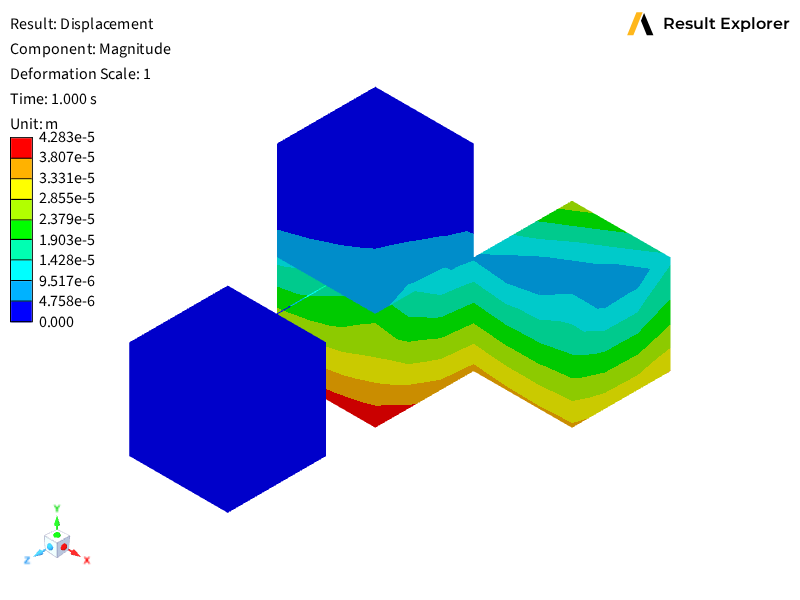
Capture and save snapshots#
Take a snapshot of the viewport and save it as a PNG file.
viewport.save_snapshot(
    file_path=slugify(sol_name + " - " + view.name) + ".png",
    settings=get_example_snapshot_settings(),
)
Create a viewport grid layout#
Create a 2x2 grid by adding viewports in different directions.
print("Creating 2 x 2 grid layout...")
top_left_viewport = viewport
bottom_left_viewport = workspace.create_viewport(
    viewport=top_left_viewport,
    direction=ViewportDirection.VIEWPORT_DIRECTION_BOTTOM,
)

top_right_viewport = workspace.create_viewport(
    viewport=top_left_viewport,
    direction=ViewportDirection.VIEWPORT_DIRECTION_RIGHT,
)

bottom_right_viewport = workspace.create_viewport(
    viewport=bottom_left_viewport,
    direction=ViewportDirection.VIEWPORT_DIRECTION_RIGHT,
)
Creating 2 x 2 grid layout...
Configure viewport synchronization#
Set synchronization options so that camera, time steps, and color ranges are shared across all viewports in the workspace.
print("Setting workspace sync options...")
workspace.set_sync(camera=True, time_freq=True, legend=True)
Setting workspace sync options...
Fullscreen display#
Set a viewport to fullscreen mode for focused viewing.
print("Setting viewport to fullscreen...")
workspace.set_fullscreen_viewport(viewport=top_left_viewport)
Setting viewport to fullscreen...
Exit fullscreen mode.
print("Exiting fullscreen...")
workspace.exit_fullscreen()
Exiting fullscreen...
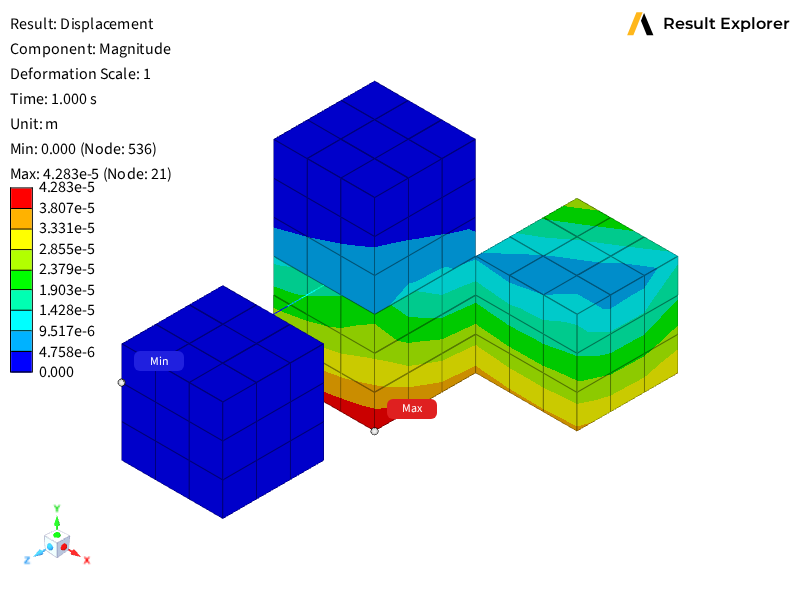
Modify display options#
Customize viewport visualization properties using the context manager. Toggle mesh edges and enable minimum/maximum labels.
print("Modifying view display options...")
with viewport.update_display_options() as opts:
    opts.show_mesh_edges = not opts.show_mesh_edges
    opts.show_min_max_labels = True
Modifying view display options...
Capture a modified snapshot#
Take a new snapshot after modifying display options and save it as a separate file.
top_left_viewport.save_snapshot(
    file_path=slugify(sol_name + " - " + view.name) + "-modified.png",
    settings=get_example_snapshot_settings(),
)
Clean up#
Delete the bottom right viewport to demonstrate viewport deletion.
print("Deleting bottom right viewport...")
workspace.delete_viewport(viewport=bottom_right_viewport)

rx.stop()
Deleting bottom right viewport...
Total running time of the script: (0 minutes 20.625 seconds)