

Note
Go to the end to download the full example code.
Create plots scoped to named selections#
This example demonstrates how to create named selections and use them to create plots in Result Explorer:
Named selections based on element IDs to filter and organize data.
Plot definitions for displacement and velocity using named selections.
Multiple result sets handling across different timesteps.
Viewport assignment to display plots side-by-side for comparison.
This example uses a transient structural analysis result with multiple timesteps for visualization.
Import the Result Explorer dependencies.
from ansys.result_explorer.core import (
    Component,
    Field,
    Location,
    PlotDefinition,
    ResultFieldName,
    ResultType,
    launch_result_explorer,
    models,
)
from ansys.result_explorer.core.examples import (
    ExampleKeys,
    get_example_file,
    get_example_snapshot_settings,
)
Launch Result Explorer#
Start a Result Explorer instance for this example.
rx = launch_result_explorer()
Locate example data#
Get the path to the example result file.
rst_path = get_example_file(ExampleKeys.RST_CP_TRANSIENT)
Create a workspace and solution#
Create a workspace and load a solution from the result file.
workspace = rx.create_workspace(name="PyRX NS Plot Workspace")

sol_name = "Coupled Field Transient Analysis"
sol = rx.create_solution(
    name=sol_name,
    file_path=rst_path,
)
print(f"Created solution: {sol.name}")
Created solution: Coupled Field Transient Analysis
Identify available result sets#
Verify the solution has multiple timesteps and extract the set IDs.
if sol.n_sets < 2:
    raise RuntimeError("This example requires at least two result sets/timesteps.")

set_ids = sorted({tf.set_id for tf in sol.time_frequencies})
if len(set_ids) < 2:
    raise RuntimeError("Could not find two distinct set IDs in time frequencies.")

set_id_1, set_id_2 = set_ids[0], set_ids[1]
print(f"Using timesteps (set IDs): {set_id_1}, {set_id_2}")
Using timesteps (set IDs): 1, 2
Create named selections#
Create named selections based on element IDs for filtering results.
ns_1 = sol.create_named_selection(
    models.NamedSelectionCreate(
        name="Elements NS 1",
        type=models.NamedSelectionType.NAMED_SELECTION_TYPE_ELEMENT,
        element_ids=[models.IdsScoping(range=models.Range(min=23, max=28))],
    )
)

ns_2 = sol.create_named_selection(
    models.NamedSelectionCreate(
        name="Elements NS 2",
        type=models.NamedSelectionType.NAMED_SELECTION_TYPE_ELEMENT,
        element_ids=[models.IdsScoping(values=[3, 4, 7, 8, 9, 11, 13, 15, 17, 19])],
    )
)

print(f"Created named selections: {ns_1.name}, {ns_2.name}")
Created named selections: Elements NS 1, Elements NS 2
Create plot definitions#
Create displacement and velocity plots using the named selections.
existing_view_ids = {v.id for v in sol.views}
plot_1 = sol.create_plot(
    PlotDefinition(
        name=f"Displacement - {ns_1.name} - set {set_id_1}",
        result_type=ResultType.displacement,
        location=Location.nodal,
        fields=[
            Field(
                name=ResultFieldName.displacement,
                components=[Component.X, Component.Y, Component.Z],
            )
        ],
        named_selection_id=ns_1.id,
        set_ids=[set_id_1],
        all_sets=False,
        last_set=False,
    )
)

existing_view_ids = {v.id for v in sol.views}
plot_2 = sol.create_plot(
    PlotDefinition(
        name=f"Velocity - {ns_2.name} - set {set_id_2}",
        result_type=ResultType.velocity,
        location=Location.nodal,
        fields=[
            Field(name=ResultFieldName.velocity, components=[Component.X, Component.Y, Component.Z])
        ],
        named_selection_id=ns_2.id,
        set_ids=[set_id_2],
        all_sets=False,
        last_set=False,
    )
)
Assign plots to viewports#
Display the plots in side-by-side viewports for comparison.
left_viewport = workspace.assign_view(view=plot_1, wait=True)
right_viewport = workspace.create_viewport(
    viewport=left_viewport,
    direction=models.ViewportDirection.VIEWPORT_DIRECTION_RIGHT,
)
right_viewport.set_view(plot_2, wait=True)

print("Opened plots in two side-by-side viewports.")
print(f" - Left viewport:  {plot_1.name}")
print(f" - Right viewport: {plot_2.name}")

# take screenshot of the two viewports

left_viewport.display_options.show_mesh_edges = True
left_viewport.save_snapshot(
    "left_viewport.png",
    settings=get_example_snapshot_settings(),
)

right_viewport.display_options.show_mesh_edges = True
right_viewport.save_snapshot(
    "right_viewport.png",
    settings=get_example_snapshot_settings(),
)

rx.stop()
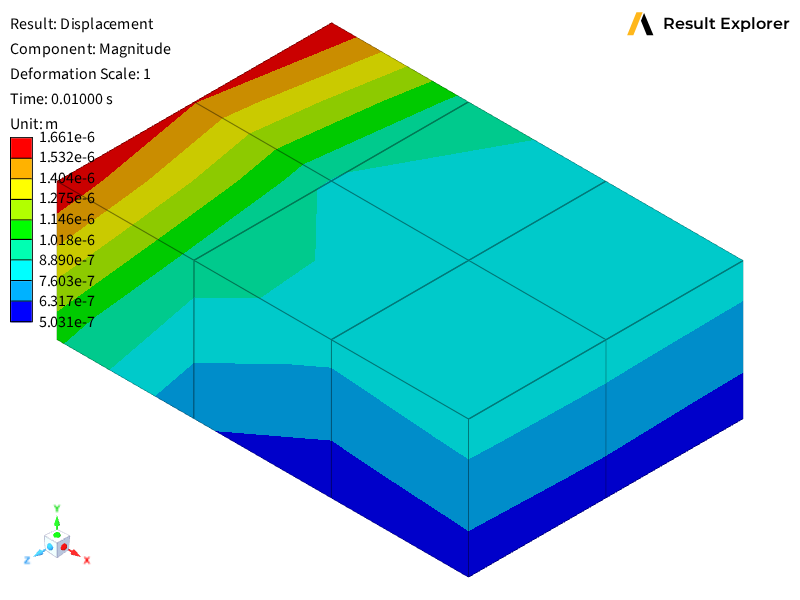
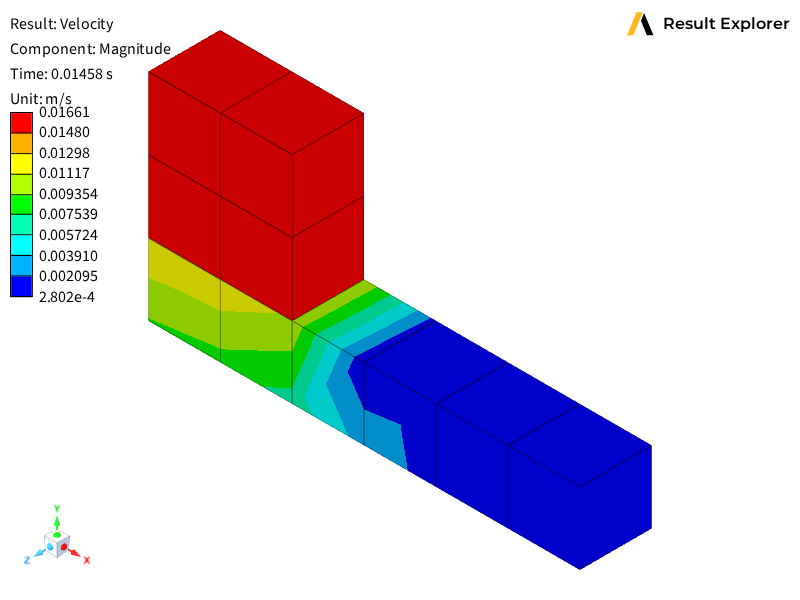
Opened plots in two side-by-side viewports.
 - Left viewport:  Displacement - Elements NS 1 - set 1
 - Right viewport: Velocity - Elements NS 2 - set 2
Total running time of the script: (0 minutes 22.379 seconds)